From Pixels to Precision Vectors.
Turn raster logos, icons, and illustrations into clean, editable SVG geometry. Shared boundaries, exact color palettes, and analytical curve fitting—built for designers and engineering workflows.
- Topology
- Zero-Gap Planar
- Primitives
- Cubic Bézier & Arcs
- Fills
- Palette & Gradients


Real engine output, magnified 6×. Drag divider to inspect edges.
Engineered as a Deterministic Planar Pipeline.
Unlike trace tools that stack independent masks on top of each other, Vectenza builds a true topological graph before fitting geometry.
Adaptive Quantization
Edge-preserving bilateral smoothing and perceptual palette clustering group noisy pixels into clean, intentional color regions.
Shared Planar Graph
Every boundary between adjacent regions is traced once as a shared half-edge chain—eliminating gaps, overlaps, and fringe halos.
Corner & Curve Fitting
Sharp corners are preserved while smooth contours are fitted with analytical lines, circular arcs, and minimum-knot Bézier splines.
Editable SVG Export
Exports compact SVG paths with linear gradients, stepped shading bands, or flat solid fills ready for Figma, Illustrator, or the web.
Same Artwork. Infinite Scale.
Magnify up to 8× and sweep the divider. Raster pixels staircase and blur; Vectenza’s mathematical curves stay razor-sharp at any resolution.
Built for Interactive Control.
Every conversion opens directly inside the Vectenza Studio—giving you granular control over palette grouping, corner geometry, and path stacking.
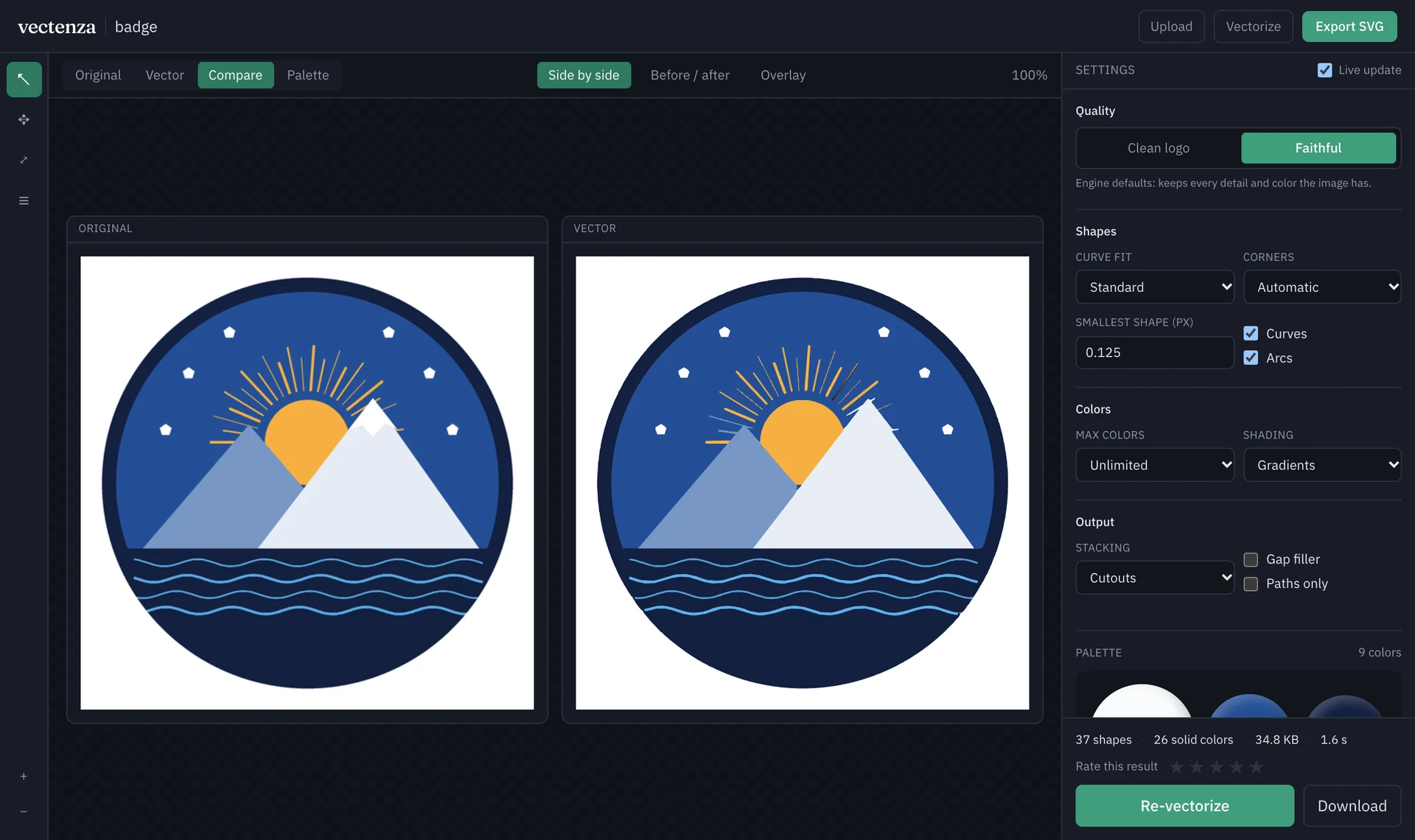
Multi-mode inspection
Verify geometry against your source image side by side, with a split curtain, or via variable-opacity overlay.
Logo or faithful presets
Switch in one click between a simplified, flat logo preset and high-detail gradient reconstruction.
Interactive color graph
Inspect detected color shares, merge similar tones, recolor groups, or punch out backgrounds into transparency.
Live engine telemetry
Tune curve tolerance, corner thresholds, and ΔE band steps with live re-vectorization and instant SVG export.
Designed for Real Production Assets.
Whether you are restoring a client’s rasterized emblem, preparing spot-color separations, or shipping scalable SVGs to production, Vectenza outputs clean DOM geometry you can edit immediately.
- Logos
- Icons
- Badges
- Illustrations
- Spot Separations
- Design Systems
Brand Logos & Marks
Recover crisp vector masters from legacy PNGs and low-res brand assets.
UI Iconography
Produce clean, single-path or cutout SVG icons ready for design systems.
Technical Illustrations
Preserve sharp geometric corners alongside smooth organic gradients.
Print & Apparel Art
Quantize artwork into exact spot-color palettes with zero-gap separations.
Frequently Asked Questions.
- How does Vectenza prevent gaps between adjacent vector shapes?
- Unlike traditional bitmap tracers that trace each color mask independently, Vectenza constructs a planar topological graph where every boundary between two regions is traced once as a shared half-edge chain.
- What image formats can I convert to SVG?
- You can upload PNG, JPEG, WebP, and GIF images into the Vectenza Studio and export clean, standards-compliant SVG 1.1 files with paths, primitives, and gradients.
- Can I customize or reduce the colors before exporting the SVG?
- Yes. The Studio detects the image palette automatically and lets you merge similar shades, split groups, recolor any swatch, or punch out background colors into transparency.
- Does Vectenza support gradients as well as flat logo colors?
- Yes. You can switch between smooth SVG linear gradients, discrete stepped color bands (configurable by ΔE step), or flat solid fills for clean logo and icon work.
Test It on Your Own Artwork.
Drop any PNG, JPEG, or WebP into the Studio, inspect the color graph, and export clean SVG paths in seconds.